- Payroll software automates salary calculation, tax deductions, and statutory filings (PT, PF, ESI, TDS).
- For Hyderabad businesses, native Telangana compliance is the #1 must-have.
- Score every vendor on the 8-point framework below — less than 60/80 = walk away.
- Expect ₹49–₹399 per employee per month, depending on company size.
Choosing a payroll system is harder than it looks in 2026. One Hyderabad HR director told us they evaluated 11 payroll software companies before signing one. Six of them couldn’t auto-file Telangana Professional Tax. Three didn’t support multi-state companies. Two had hidden setup fees north of ₹50,000.
This guide is the 8-step framework Hyderabad businesses use to evaluate payroll software — whether you’re a 10-person startup or a 500-employee enterprise. By the end, you’ll know exactly how to choose payroll software that handles your compliance, headcount, and budget without surprises.
Our payroll system is built for Hyderabad and Telangana businesses with auto PT, PF, ESI, and TDS. See features → or
Ready to Run a Flawless Payroll This Month?
You can keep evaluating tools — or you can see one that’s already built for Hyderabad. We handle Telangana PT, PF, ESI, TDS, multi-location payroll, WhatsApp payslips, and local Hyderabad support, all from one platform starting at ₹49/employee/month.
Related reading: Telangana Professional Tax 2025–26 · Telangana Shops Act Registration · Best Cloud HR Software in Hyderabad · Free CTC Calculator · FAQs
What Is Payroll Software? (And Why Spreadsheets Aren’t Enough)
Payroll software is a system that automates salary calculation, statutory deductions, and salary disbursement for employers. Modern payroll processing software goes beyond basic salary math — it handles Professional Tax, Provident Fund, ESI, TDS, Form 16 generation, bank file outputs, and digital payslips, all from one dashboard.
The shift from spreadsheets to payroll process software isn’t just convenience. According to a Telangana Labour Department-aligned compliance survey, 73% of Indian SMBs running manual payroll face at least one statutory penalty in their first three years — most commonly missed PT or PF deadlines.
Definition box: payroll software vs HR software vs HRMS
| Payroll software | Salary processing, statutory filings, payslip generation, bank disbursement |
| HR software | Employee lifecycle: hiring, onboarding, performance, leave, exit |
| HRMS | Both, plus deeper analytics — also called HCM or “all-in-one” tool |
Modern Indian platforms — including our payroll module, attendance, and leave management — bundle all three so you don’t pay for separate tools.
Types of Payroll Systems Used by Indian Businesses
Before evaluating vendors, know the four types of payroll systems common in India:
| Type | Best for | Real-world cost |
|---|---|---|
| 1. Excel / Manual | Sole proprietors, < 5 employees | Free (but ~12 hrs/month of work) |
| 2. Outsourced (CA / Consultant) | 5–20 employees with simple structures | ₹500–₹2,000 per employee |
| 3. Cloud SaaS (online) | 20–500 employees, multi-location | ₹49–₹399 per employee/month |
| 4. Enterprise / On-premise | 500+ employees with custom workflows | ₹6 lakh+ annual + setup |
For 90% of Hyderabad SMBs, type 3 (Cloud SaaS) wins. Online payroll services for small business in India have matured fast — they cost less than a CA outsource and give you control over your own data. The decision below assumes you’re evaluating cloud-based top payroll software options.
Why Hyderabad Businesses Need Specialized Payroll Software
National HR platforms work — until you hit Telangana-specific requirements. Most best rated payroll software for global markets handles Karnataka, Maharashtra, or Tamil Nadu well, then asks you to “configure” Telangana yourself. That’s where compliance gaps creep in.
The Hyderabad payroll context is unique:
- Telangana Professional Tax has slabs that change. Generic tools default to Maharashtra rates and silently miscalculate.
- Multi-location operations across HITEC City, Gachibowli, Madhapur, Nanakramguda, and Secunderabad need different jurisdictional handling.
- IT/ITES exemptions (women working past 8 PM in HITEC City) need correct labour record-keeping.
- GCC payrolls mix Indian salary structures with USD/EUR-denominated bonus pools — needs flexible structures.
- Local language support (Telugu) for blue-collar workforce in manufacturing belts like Balanagar and Patancheru.
So when you evaluate a payroll system, the question isn’t “does it process payroll?” It’s “does it process MY payroll, in MY city, with MY compliance setup?” That’s the real test of best payroll software in India for Hyderabad-based teams.
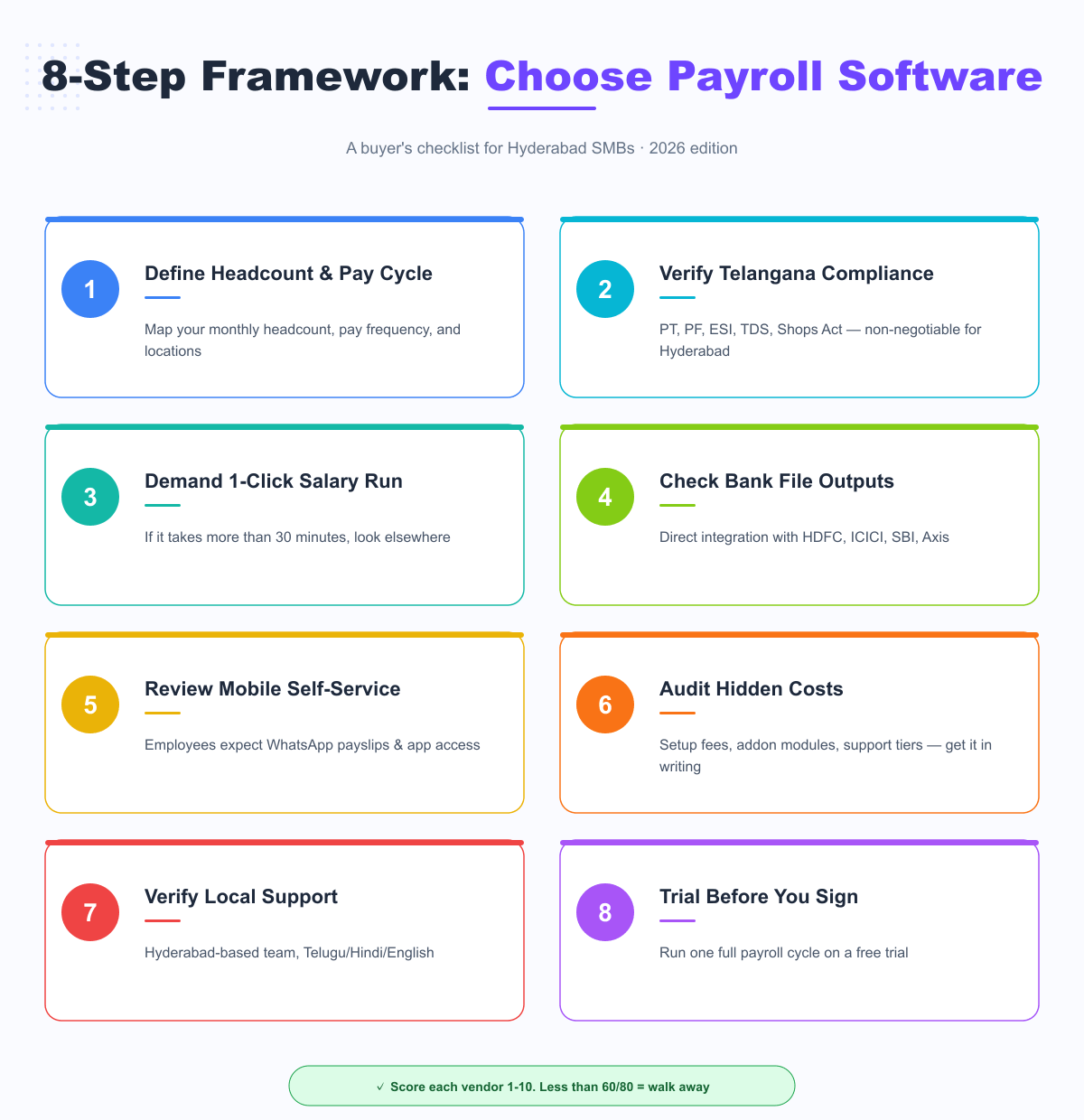
How to Choose Payroll Software: The 8-Step Framework
Step 1: Define Your Headcount, Pay Cycle & Locations
Before talking to payroll software companies, write down:
- Current headcount and projected headcount in 12 months
- Pay frequency (monthly, weekly, daily for contract staff)
- Number of locations (city, state, country)
- Mix of full-time, contract, and consultant employees
- Annual gross salary spend
Why this matters: every vendor will ask, and the wrong tier signed = either overpaying for unused features or hitting employee limits in 6 months. See our pricing tiers for an example of how plans typically scale.
Step 2: Verify Telangana-Specific Compliance
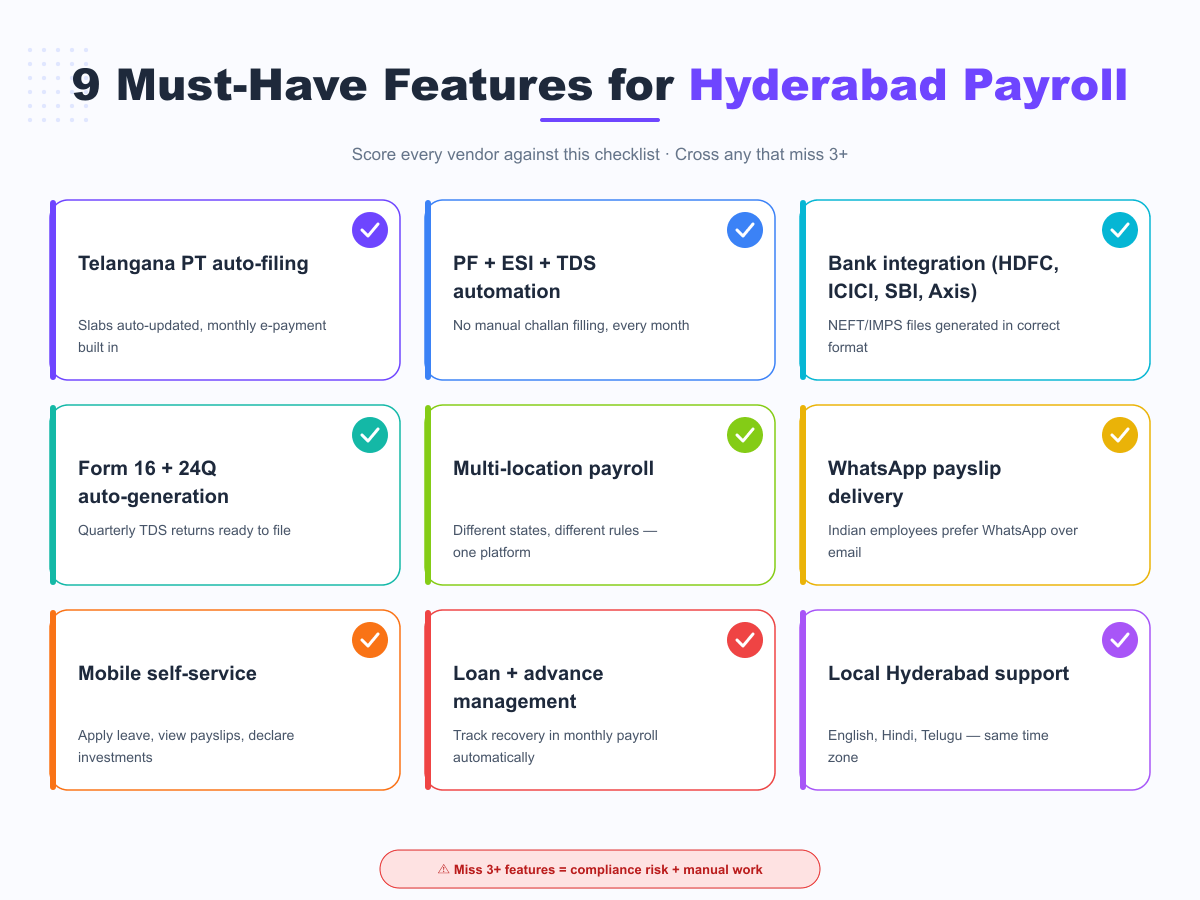
This is non-negotiable for Hyderabad businesses. The vendor must auto-handle:
- Telangana Professional Tax with current 2025–26 slabs and monthly e-filing
- PF contributions and ECR uploads to EPFO
- ESI deductions and monthly payments
- TDS calculation and Form 16 / Form 24Q generation
- Telangana Shops & Establishments Act records
- Labour Welfare Fund deductions (₹2 employee + ₹5 employer/month in Telangana)
Ask the vendor: “Show me how a new Telangana employee is set up end-to-end, including PT slab assignment.” If they need to “check” or “we’ll get back to you,” they don’t have native Telangana support — and you’ve just disqualified one of your best payroll solutions shortlist.
Step 3: Demand a 1-Click Salary Run
The single biggest difference between modern payroll software and “old payroll software with a website” is execution time.
| Workflow | Modern | Old |
|---|---|---|
| Process monthly payroll (50 employees) | 15–30 minutes | 4–8 hours |
| Generate bank file | 1 click | Manual export + format conversion |
| Send payslips | Auto WhatsApp/email | PDF attachments individually emailed |
| Compliance reports | Built-in | Manual download from each portal |
If the demo shows more than 5 clicks for a salary run on 50 employees, walk away.
Step 4: Check Bank File Outputs
Indian banks have specific NEFT/IMPS file formats. Your payroll software must generate ready-to-upload files for at least the major Hyderabad business banks:
- HDFC NEFT format
- ICICI Connected Banking
- SBI Corporate Internet Banking
- Axis CMS
- Kotak BizN
Ask for a sample exported file in the demo — not a screenshot, the actual file.
Step 5: Review Mobile Self-Service
Indian employees expect mobile-first HR experiences. Your payroll system should let employees:
- View and download payslips from their phone
- Apply for leave from a mobile app
- Submit IT declarations and reimbursement claims
- Receive payslips via WhatsApp (lifesaver in factory and field roles)
- View YTD earnings, tax projections, and Form 16
Ask to see the employee mobile app side-by-side with the admin desktop. If the mobile app feels like a “Lite” version, employee adoption will be poor.
Step 6: Audit Hidden Costs
The sticker price on the pricing page is rarely the final cost. Get every vendor to give you written confirmation on:
- Setup / implementation fee (often ₹15,000–₹75,000)
- Migration cost from your existing system
- Per-module add-on fees (some vendors charge ₹50/employee for “advanced reports”)
- Support tier upgrades (entry plans often have 48-hour response SLAs)
- Annual contract vs monthly pricing — annual saves 15–25%, but lock-in cost can hurt
- Compliance updates — are tax slab updates included or charged?
A ₹49/employee plan can become ₹179/employee with all the add-ons. Get every line item in the proposal.
Step 7: Verify Local Hyderabad Support
When something breaks at 6 PM on the 30th of the month and salaries are due tomorrow, you need a local team that picks up the phone. Verify:
- Support hours match Indian business hours (not “9–5 PT”)
- Local language options — English, Hindi, and ideally Telugu
- Phone, email, and chat support — not “raise a ticket only”
- Average first-response time (ask for documented SLA)
- Onboarding included in the price (or extra)
Bonus: ask if their support team is in Hyderabad. Same-city teams understand local context — Telangana e-Sthapana portal nuances, regional bank quirks, monsoon-related business interruptions — better than anyone.
Step 8: Demo Before You Sign
Never sign a multi-year payroll contract without running at least one full payroll cycle on a free demo. The demo should let you:
- Upload a sample of 10–20 real employees
- Configure their actual salary structure (basic, HRA, special allowances)
- Run a complete payroll for one month
- Generate the bank file and verify the output
- Test the employee mobile experience
If a vendor refuses a demo or limits it to a sandbox with fake data, that’s a yellow flag. Confidence in their product comes from showing it work on your data.
How to Choose a Payroll Provider Based on Company Size
Your size and growth stage determine which features matter most. Here’s the breakdown:
Best Payroll Software for Small Business (1–25 employees)
If you’re under 25 employees, your priorities are:
- Lowest setup friction — onboarding in < 2 weeks
- Pay-as-you-grow pricing — no minimum employee fees
- Built-in compliance — PF, ESI, PT, TDS without addons
- WhatsApp payslips — your team won’t check email reliably
- Self-service via founder/HR generalist — no need to hire a payroll specialist
Avoid enterprise tools (Workday, Oracle) at this stage — they’re priced for 1,000+ employees and need full-time admins. Stick with online payroll services for small business built for India: priced at ₹49–₹99 per employee per month, no setup fees, and quick Telangana compliance setup.
Payroll Software for Medium-Sized Business (26–250 employees)
At this size, complexity grows fast:
- Multiple cost centers and projects (track expenses to budgets)
- Variable pay components (commissions, bonuses, performance pay)
- Multi-location operations (different state PT slabs, different bank flows)
- Loans, advances, and salary recovery tracking
- Attendance integration with biometrics or geo-fencing
- Approval workflows for payroll changes (no single-point-of-failure)
This is the sweet spot for top payroll software in the cloud — you get all enterprise features without the enterprise price. Expect to pay ₹99–₹199 per employee per month with all features unlocked.
Enterprise Payroll (250+ employees)
At this stage, you need custom workflows, API-level integrations with your ERP / accounting / GL systems, and dedicated implementation managers. Plans typically run ₹199–₹399 per employee per month, with some custom-quoted by vendor.
Pricing: How Much Should Payroll Software Cost in Hyderabad?
Pricing varies dramatically. Here’s the realistic 2026 range for Hyderabad SMBs:
| Company size | Monthly cost (per employee) | Plan name (typical) |
|---|---|---|
| 1 to 25 employees | ₹49 to ₹99 | Starter / Lite |
| 26 to 100 employees | ₹99 to ₹199 | Growth / Standard |
| 101 to 500 employees | ₹199 to ₹399 | Premium / Pro |
| 500+ employees | Custom (₹299–₹999) | Enterprise / Custom |
Watch out for plans that look cheap (₹49/emp) but exclude PF/ESI auto-filing or charge separately for compliance updates. The total cost of ownership matters more than the per-seat list price.
Red Flags: When to Walk Away
If you encounter any of these during evaluation, cross the vendor off your list:
- ❌ Cannot show a Telangana employee setup with PT slab assignment in the demo
- ❌ Demo is “with fake data only” or limited to under 14 days
- ❌ Setup fee is non-refundable even if you cancel in the first month
- ❌ Refuses to share customer references in your industry / size band
- ❌ Pricing page differs significantly from sales quote
- ❌ Support team is offshore (Philippines, Eastern Europe) for India clients
- ❌ “Compliance updates” are billed separately
- ❌ No native mobile app — only “responsive web”
The Hyderabad Advantage: Why Local Tools Win
Global HRMS giants spend most of their R&D on US compliance and global features. India is a tertiary market for them. That shows up in:
- Quarterly tax slab updates that lag the Telangana gazette by 60+ days
- Generic templates that don’t match Telangana e-Sthapana portal formats
- Support teams who don’t understand Indian salary structures (CTC vs Gross vs Take-Home)
- Pricing in USD that floats with the rupee — making budgeting unpredictable
Specialist Indian payroll tools — and especially Hyderabad-built tools — invest 100% of their effort in solving exactly the problems your business has.
See HRSoftwareHyderabad payroll → built for Hyderabad SMBs from day one.
Book a free → and we’ll show all 8 framework points live.
Frequently Asked Questions
How do I choose payroll software for my business in Hyderabad?
Use the 8-step framework above: define headcount, verify Telangana compliance (PT, PF, ESI, TDS), demand a 1-click salary run, check bank file outputs, review mobile self-service, audit hidden costs, verify local Hyderabad support, and run a free demo before signing. Score each vendor 1–10 on every step — anything below 60/80 should be eliminated.
What is the best payroll software in India for small businesses?
The best payroll software for small business in India in 2026 has these traits: priced at ₹49–₹99 per employee per month, includes built-in Telangana PT, PF, ESI, TDS automation, supports WhatsApp payslip delivery, has a native mobile app, and offers Hyderabad-based support in English, Hindi, and Telugu. Avoid enterprise tools at this stage — they’re priced for 1,000+ employee companies.
Want to evaluate the salary structure format before buying any HR software? Download our free payslip template in Excel — preconfigured with Telangana PT, EPF, ESI, and TDS formulas, plus 50+ other free HR templates.
What are the different types of payroll systems used by Indian companies?
Four main types: (1) Manual / Excel — for sole proprietors with under 5 employees; (2) Outsourced to a CA — common for 5–20 employees but expensive at scale; (3) Cloud SaaS payroll — best for 20–500 employees, costs ₹49–₹399 per employee per month; (4) Enterprise / on-premise — for 500+ employees with custom workflows. For 90% of Hyderabad SMBs, cloud SaaS wins on price, features, and compliance accuracy.
How much does payroll processing software cost in India?
Cloud-based payroll processing software in India ranges from ₹49 to ₹999 per employee per month, depending on company size and feature tier. Most Hyderabad SMBs (under 100 employees) pay ₹99–₹199 per employee per month with full Telangana compliance, employee self-service, and bank integrations included. Always verify there are no hidden setup or per-module fees.
Is online payroll software safe for Indian companies?
Yes, when using established providers. Modern Indian payroll software stores data in AWS Mumbai, Azure India, or local Tier-3 data centers. Look for ISO 27001 certification, SOC 2 Type II compliance, and DPDP Act 2023 alignment. End-to-end encryption, role-based access, and audit logs are now standard for the best rated payroll software in India.
Can payroll software handle multi-state operations from a Hyderabad headquarters?
Yes — but only if the tool natively supports state-specific Professional Tax, Labour Welfare Fund, and Shops Act rules for each state. Many tools claim multi-state support but require manual configuration per state. Always test with a Telangana + Karnataka combination during the demo to verify auto-handling of state-specific deductions.
Does payroll software integrate with attendance and leave management?
The best payroll solutions integrate seamlessly with attendance tracking and leave management. This auto-syncs working days, overtime, leave-without-pay, and shift differentials directly into the payroll calculation. Standalone payroll without this integration adds 8–10 hours of manual reconciliation per month.
How do I migrate from a CA-outsourced payroll to in-house software?
Start the migration on April 1 (financial year start) so all Form 16 reporting comes from one system. Week 1 is data export from your CA and structure mapping. Week 2 is setup and parallel run. Weeks 3 to 4 are validation, employee onboarding, and the first live payroll. For Hyderabad businesses, look for vendors offering free migration assistance — most reputable payroll software companies include this in onboarding.
Follow HRSoftware Hyderabad on LinkedIn
Get weekly Telangana HR compliance updates, hiring trends, and SMB HR tips.
→